Blog

  • Topical Authority in SEO: What It Is and How to Build It (2026)

    Topical Authority in SEO: What It Is and How to Build It (2026)

    Topical authority is the reputation your website earns for a specific subject. When you consistently publish helpful content that covers a topic from multiple angles, Google is more likely to treat your site as a credible resource for related searches.

    If you're building a B2B SaaS blog, topical authority is the difference between publishing random posts that never compound and building a connected library that keeps ranking over time. Achieving that kind of compounding growth is much easier with Supawriter, because research, writing, optimization, internal linking, and publishing can run as one system instead of a pile of one-off tasks.

    what topical authority is (and what it isn't)

    definition in plain English

    Topical authority (in SEO) is how strongly search engines associate your website with expertise and usefulness on a particular topic.

    That's why so many high-ranking guides talk about "depth and breadth" of coverage, you don't just have one good page, you have a network of pages that answers the real questions people ask around that subject.

    Two clarifications:

    • There isn't a single public "topical authority score" from Google. It's something you infer from performance, for example, more rankings across a cluster, faster indexing, better stability, and more internal pages ranking.
    • Tools can estimate topical relevance, but they're approximations. Semrush describes its "Topical Authority" as a proprietary metric that indicates how relevant a domain is to the topic of a seed keyword. That's useful directionally, but it isn't Google's internal measure. (Semrush explanation)

    topical authority vs domain authority vs E-E-A-T

    Topical authority is often lumped together with a few related concepts:

    • Domain authority (DA) / page authority (PA): third-party metrics meant to predict ranking ability. They're useful for rough comparisons, but they're not Google ranking factors.
    • E-E-A-T: a quality concept from Google's Search Quality Rater Guidelines that stands for Experience, Expertise, Authoritativeness, and Trust. Google notes that E-E-A-T itself isn't a single ranking factor, but its systems aim to surface content that looks most helpful and trustworthy, especially for sensitive topics. (Google on E-E-A-T)

    In practice, topical authority is one of the clearer ways to demonstrate E-E-A-T at scale: your site keeps answering the topic well, shows real experience where it matters, cites sources when needed, and stays current.

    why topical authority matters more as search gets more semantic

    Search has shifted from matching exact keywords to understanding meaning. Search engines increasingly look at whether a site covers a topic thoroughly and connects related concepts clearly, which is why "semantic depth" and entity coverage come up so often in SEO discussions. (Search Engine Land on semantic depth)

    The takeaway: topical authority isn't a trick. It usually comes from building a site that helps users learn and decide.

    how topical authority works (how Google connects the dots)

    breadth vs depth: the two levers you control

    A simple way to think about topical authority is a T-shape:

    • Breadth: you cover the major subtopics and common questions.
    • Depth: you go beyond basics on the subtopics that matter most, with examples, steps, and clear explanations.

    If you only do breadth, your content stays shallow. If you only do depth on one page, you look like a one-hit wonder. Authority builds when both accumulate over time.

    topic clusters, entities, and internal links

    Most sites build topical authority through a pillar and cluster model:

    • A pillar page targets the broad topic and acts as the hub.
    • Cluster pages target subtopics and specific intents (definitions, comparisons, how-tos, templates, troubleshooting).
    • Internal links connect the hub to spokes and spokes to each other, so both users and search engines can understand relationships.

    This is also where entities matter. A strong topical cluster naturally mentions and explains the key things that define a topic (concepts, processes, tools, frameworks), not just keyword variations.
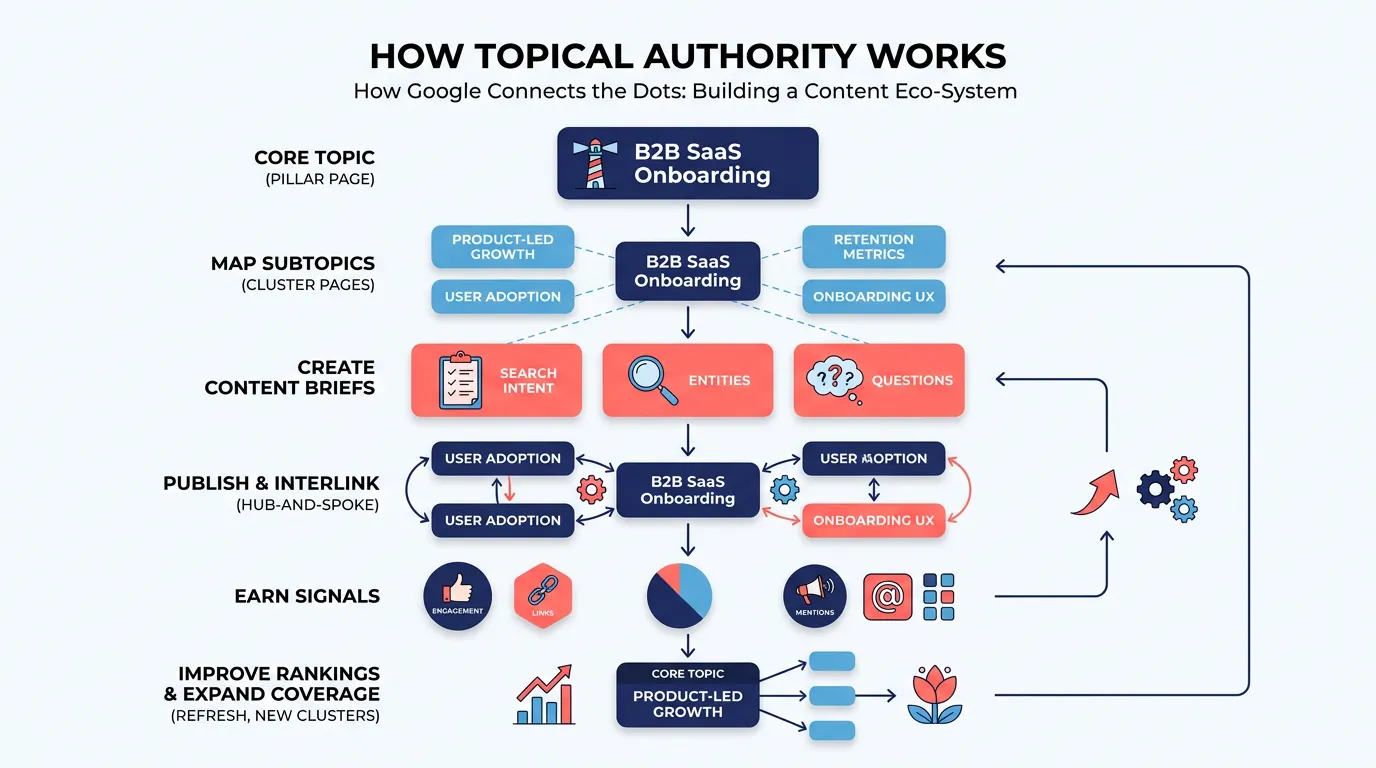
    Flowchart showing steps to build topical authority from a pillar topic to clusters, internal links, and ranking improvements

    the signals that often move alongside authority

    You can't control Google's internal evaluation directly, but you can control inputs that often line up with topical authority growth:

    • More pages ranking for related queries (not just one head term)
    • More impressions across long-tail searches
    • Better internal link discovery (fewer orphan pages)
    • More natural backlinks and mentions as your content becomes a common reference
    • More stable rankings because you've covered the topic more completely

    Ahrefs also frames topical authority as becoming a go-to resource on a topic, and notes that creating lots of relevant content enables more internal linking and can earn more natural backlinks over time. (Ahrefs guide)

    a practical example of topical authority (B2B SaaS)

    pick a core topic and draw the cluster map

    Let's say your SaaS sells a product analytics platform. A core topic you could try to own is product analytics.

    A cluster map could include subtopics like:

    • event tracking
    • product KPIs (activation, retention, expansion)
    • cohort analysis
    • funnels
    • instrumentation plans
    • data governance
    • privacy and consent
    • analytics for PLG teams

    build pillar and supporting pages by intent

    To build authority faster, don't publish ten definitions in a row. Mix intent:

    • Definition: "What is product analytics?"
    • How-to: "How to build an instrumentation plan"
    • Template: "Instrumentation plan template (with examples)"
    • Comparison: "Product analytics vs web analytics"
    • Problem-solving: "Why your funnel conversion rate is misleading"

    That variety matters because people enter from different searches, but they still want a clear path to the rest of the topic.

    When it comes to turning that map into publish-ready content consistently, Supawriter offers an end-to-end workflow: topic research, long-form drafts, on-page SEO optimization, contextual internal linking suggestions, and scheduling so clusters get built deliberately.

    interlinking rules that make the cluster coherent

    Use simple rules you can apply every time:

    • Every cluster page links back to the pillar with a descriptive anchor.
    • The pillar links out to every cluster page.
    • Cluster pages cross-link when it actually helps the reader (for example, "cohort analysis" should link to "retention metrics").
    • Avoid generic anchors like "click here." Use anchors that describe what's on the page.

    If you want tooling ideas for scaling this, you can also reference our guide to internal linking tools in 2026.

    how to build topical authority step by step

    step 1: choose a focused topic you can own

    Most sites fail here by picking something too broad.

    Good: "B2B onboarding emails," "SOC 2 compliance for SaaS," "product-led growth metrics."

    Too broad: "marketing," "security," "SaaS."

    A practical filter is: can you realistically publish 20 to 50 high-quality pages around this topic within 3 to 6 months? If not, narrow the scope.

    step 2: do topic-first research, not keyword-only research

    Keyword research still matters, but topical authority comes from understanding the space:

    • core definitions and sub-definitions
    • common "how do I" questions
    • comparisons and alternatives
    • frameworks and checklists
    • mistakes and troubleshooting
    • tools and workflows

    You can turn this into a repeatable process by building a topic brief that includes:

    • primary intent (learn, compare, do)
    • related entities to cover
    • must-answer questions
    • internal links to include

    step 3: publish, link, refresh, and expand on a schedule

    Topical authority compounds when your publishing is structured:

    1. Publish the pillar (or a "minimum viable pillar") early.
    2. Publish 6 to 10 cluster pages that cover the most searched subtopics.
    3. Add internal links immediately as new pages go live.
    4. Refresh pages that start gaining impressions but not clicks.
    5. Expand with adjacent subclusters.

    Supawriter helps teams keep that cadence without sacrificing quality. It can help you research, draft 2,500+ word articles, optimize on-page SEO, and maintain a publishing schedule so your cluster grows in a planned sequence.
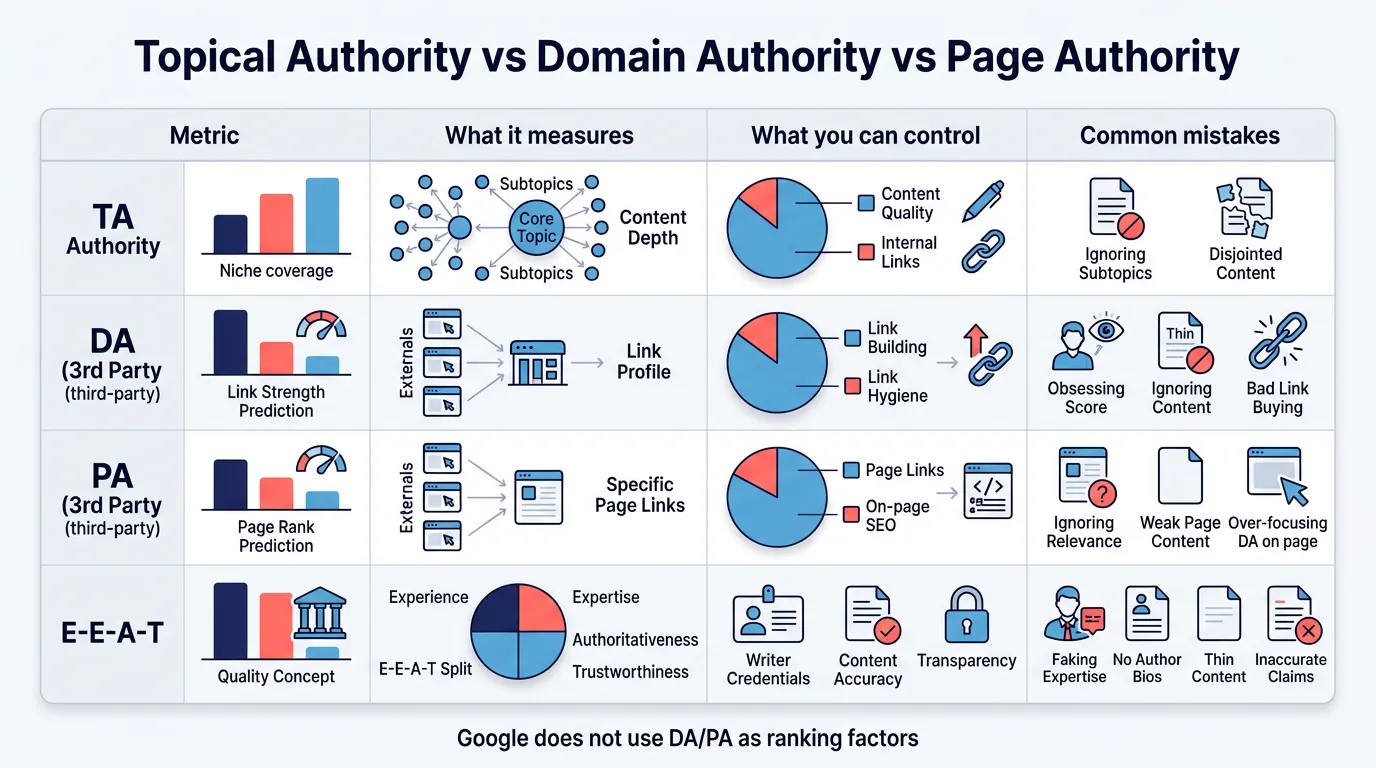
    Comparison chart contrasting topical authority with domain authority, page authority, and E-E-A-T

    how to measure topical authority (without chasing vanity metrics)

    what to track in Google Search Console

    In Google Search Console (GSC), topical authority shows up as patterns across a topic cluster, not a single keyword win.

    Track:

    • Total impressions for pages in the cluster
    • Number of queries those pages appear for
    • Average position trends across the cluster
    • Pages indexed and "discovered" rate
    • CTR improvements after title and snippet updates

    A simple approach is to create a GSC page filter that includes your cluster URL path (for example, /product-analytics/) and monitor performance as a group.

    using third-party "topical authority" checkers the right way

    Third-party metrics can help if you use them as diagnostics, not goals.

    Here's a practical interpretation table:

    Tool output What it usually means What to do next
    High relevance, low rankings You're thematically aligned but underpowered Improve internal links, expand missing subtopics, earn a few relevant links
    Moderate relevance Partial coverage or unclear positioning Build the cluster deeper, tighten intent targeting
    Low relevance Topic mismatch Choose a narrower topic or create a dedicated section/subdirectory

    Semrush, for example, explains its Topical Authority as a proprietary algorithm that compares a domain's thematics with a keyword and categorizes relevance from low to high. Use that to spot misalignment and content gaps, not as a promise of top rankings. (Semrush metric details)

    common pitfalls that prevent authority from compounding

    These issues stop topical authority from building even when you publish a lot:

    • Orphan pages (no internal links in or out)
    • Inconsistent intent (a page tries to be definition, comparison, and how-to all at once)
    • Thin coverage (you skip the obvious questions users need answered)
    • Cannibalization (multiple pages targeting the same subtopic without differentiation)
    • No refresh loop (older pages decay and drag down the cluster)

    If you want one guiding principle, use Google's "helpful, reliable, people-first" framing: create content that demonstrates experience and earns trust, and structure it so users can navigate the topic end to end. (Google guidance)

    Topical authority is ultimately a content system problem: planning, coverage, interlinking, and consistent publishing. If you want that system to run with less manual effort, explore how Supawriter can research your topic, produce on-brand long-form content, optimize it for SEO, and publish clusters that actually compound into authority over time.

  • Internal Linking Tools in 2026: 10 Best Options Compared

    Internal Linking Tools in 2026: 10 Best Options Compared

    Internal linking is one of the few SEO levers you fully control, but it is also easy to neglect as your content library grows. Internal linking tools make the work repeatable, they audit your site’s internal links, surface link opportunities, and in some cases insert links automatically.

    If you are building a content engine, internal links are not a one-time checklist item. You need a system that keeps new posts connected, strengthens topic clusters, and prevents orphan pages from slipping out of the crawl path. That consistency is easier to keep with Supawriter, especially if you publish frequently and want internal linking to happen as part of writing and publishing.

    What internal linking tools do (and what to look for)

    The jobs these tools automate

    Most internal linking tools handle three jobs:

    1. Internal link discovery and audits: Find orphan pages, broken internal links, redirect chains, pages that are too deep in your crawl path, and pages with weak internal link signals.
    2. Contextual internal link suggestions: Recommend which pages you should link to from a given page (and sometimes suggest anchor text).
    3. Implementation help: Insert links in the editor, bulk-add links, or auto-link terms based on rules.

    Good tools do not just add more links. They help you keep a clean internal structure so important pages are easier for users and crawlers to find, and so internal authority can flow through your site. Semrush, for example, calls out internal linking issues and orphan pages as part of its auditing workflow, see the Semrush internal links guide.

    Features that matter most in 2026

    When you compare internal linking tools, it helps to use a simple checklist instead of getting distracted by AI labels:

    • Suggestion quality: Are recommendations based on topical relevance, not just keyword matches?
    • Controls and exclusions: Can you exclude pages, categories, or URL patterns? Can you stop links to conversion pages appearing in every paragraph?
    • Anchor text governance: Can you edit anchors, enforce variations, and avoid repetitive exact-match anchors?
    • Workflow: Is there a review queue, or is it fully automatic? Can multiple team members collaborate?
    • Scalability: Does it handle thousands of URLs without turning into a spreadsheet project?
    • Data sources: Crawl-only, or does it pull in performance signals (Search Console, analytics) so you can prioritize?

    Common mistakes to avoid with automation

    Automation helps, but it can also create patterns that feel spammy or hard to read:

    • Over-linking: Stuffing internal links into every sentence makes content harder to read.
    • Weak source pages: Linking from thin pages does less than strengthening your content hubs.
    • Bad anchors: Repetitive anchors, vague anchors (“here”), or anchors that do not match the destination.
    • Linking to redirects: Automated insertion can accidentally point to redirected URLs if your site is not clean.

    A safe approach is simple: tools generate candidates, humans approve patterns, then you measure impact over time.

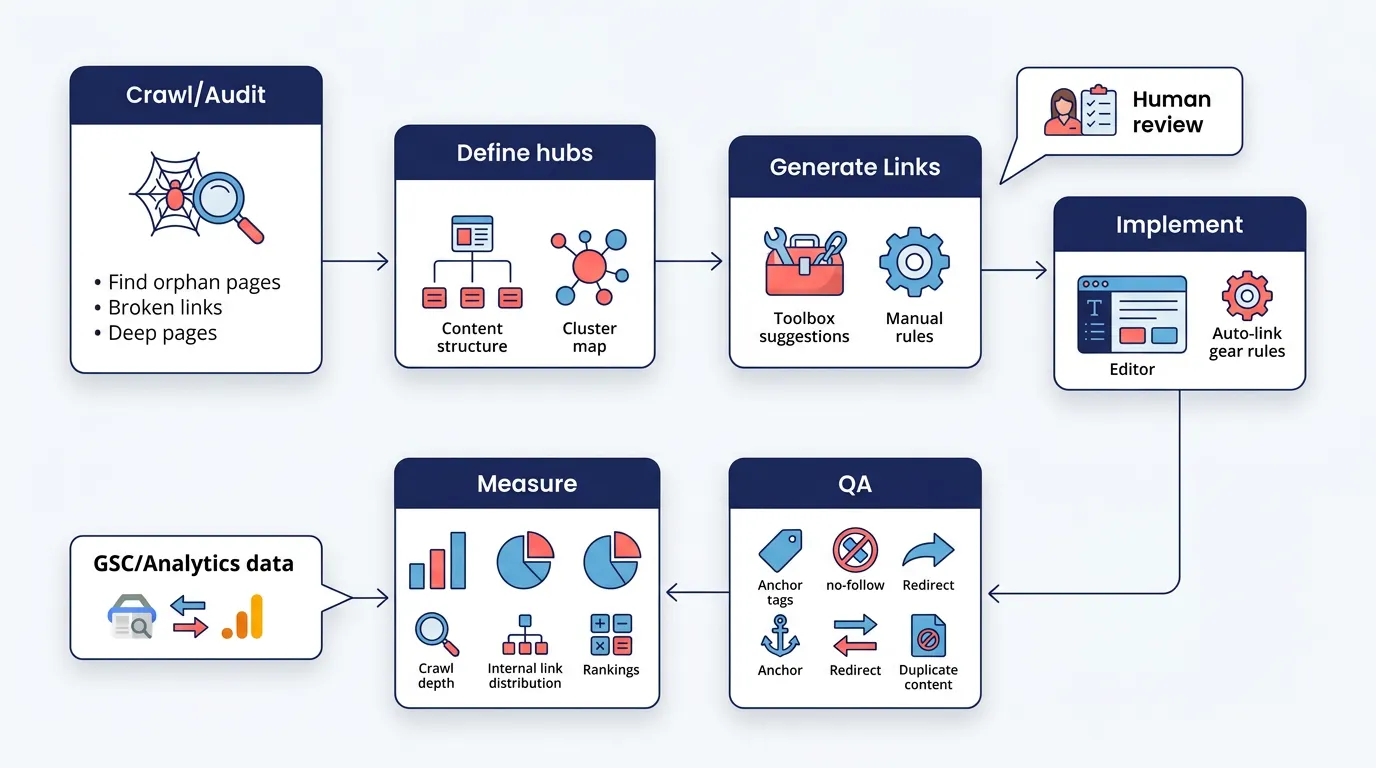
    Flowchart of an internal linking workflow from audit to implementation and measurement.

    10 best internal linking tools in 2026 (reviewed)

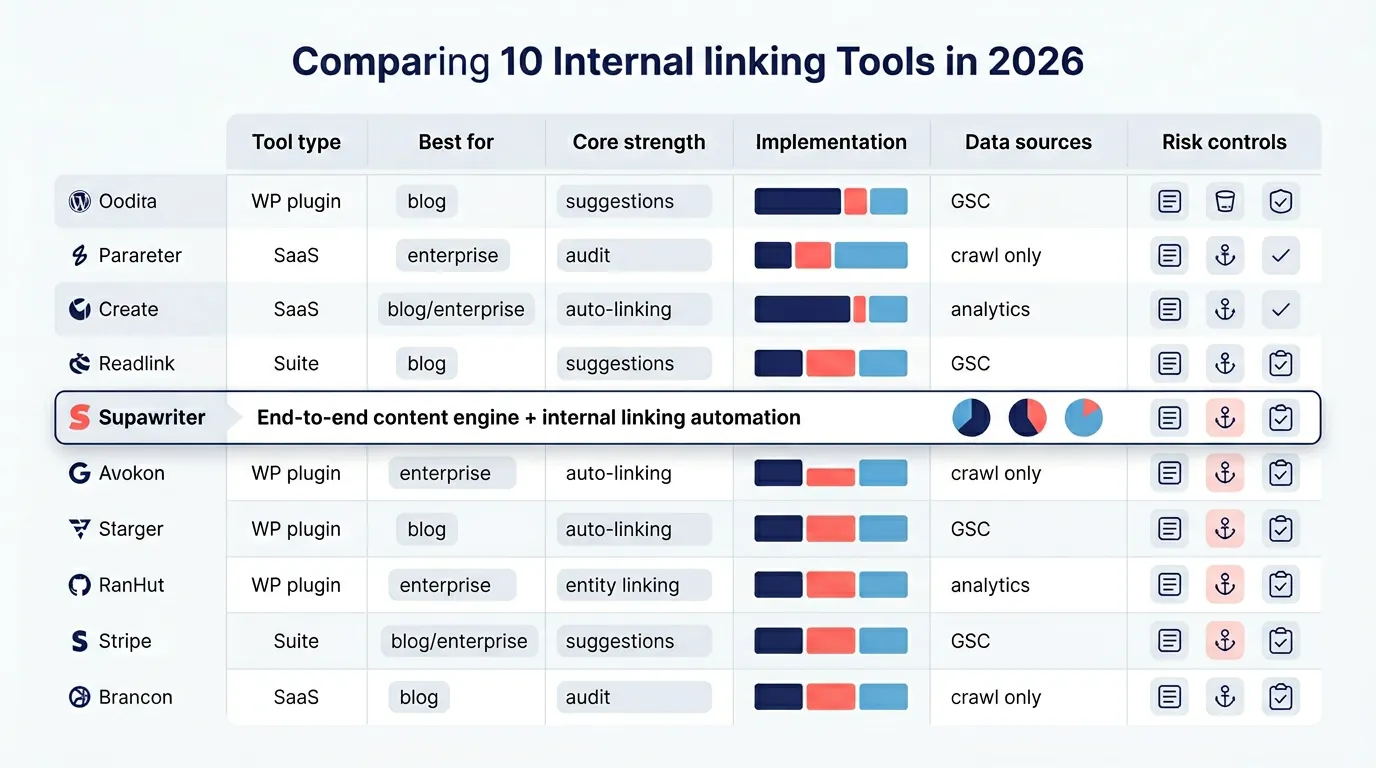
    Below are 10 widely used options across three buckets: WordPress plugins, SEO suites, and specialized internal linking platforms.

    Tool Type Best for Strength Implementation style
    Supawriter Content engine + CMS SaaS teams, agencies, scale publishing Internal linking built into writing and publishing Automated suggestions with editorial control
    Link Whisper WP plugin WordPress publishers Strong suggestions + reporting In-editor + bulk features
    Yoast SEO Premium WP plugin WP teams already using Yoast Simple inline suggestions In-editor suggestions
    AIOSEO Link Assistant WP plugin WP marketers Suggestions inside WP In-editor workflows
    Rank Math WP plugin WP power users SEO suite features In-editor + module-based
    Internal Link Juicer WP plugin WP sites that want rule-based links Auto-link rules Automated by keywords/rules
    Semrush Site Audit SEO suite Teams that need audits at scale Diagnostics and issue lists Fixes implemented in CMS/dev
    Surfer Automated Internal Linking SEO tool Content teams using Surfer Fast contextual insertion Semi-automated insertion
    InLinks SEO platform Entity-focused SEO Entity-based linking and audits Recommendations + implementation approach
    LinkStorm Specialized tool Agencies and publishers AI suggestions at scale Suggestion + implementation support

    1) Supawriter

    Supawriter is an AI-driven SEO content engine and CMS that can research, write, optimize, and publish long-form content. Internal linking fits naturally because the platform is built around maintaining a connected content library, not just generating a single draft.

    Key internal-linking-related capabilities include suggesting internal links while producing long-form content, keeping topical coverage consistent across a content calendar (which makes linking more predictable), and tying internal links into the wider on-page workflow so links do not become a cleanup task.

    Pros

    • Works well when internal linking needs to scale with publishing.
    • Keeps internal linking connected to content strategy, not just page-level edits.

    Cons

    • If you only want a WordPress plugin that inserts links, a dedicated WP tool may feel simpler.

    Best for: SaaS founders and growth teams, in-house content teams, and agencies that want an end-to-end system.

    Pricing: Varies by plan; check the product page for current tiers.

    2) Link Whisper

    Link Whisper is an internal linking plugin known for generating link suggestions and helping you implement them quickly in WordPress.

    Key features

    • Internal link suggestions inside your workflow.
    • Reporting to spot gaps and opportunities.

    Pros

    • Good fit for WordPress sites that want link suggestions without switching platforms.
    • Straightforward to use for non-technical teams.

    Cons

    • WordPress-only constraints can be limiting for multi-site or headless setups.
    • You still need editorial judgment to keep links natural.

    Best for: WordPress blogs and content-heavy sites.

    Pricing: Paid plugin; exact pricing varies.

    3) Yoast SEO Premium

    Yoast SEO Premium includes internal linking suggestions that point you to relevant posts to link to while you write and edit, see Yoast internal linking suggestions.

    Key features

    • Suggestions inside the WordPress editor.
    • Designed to speed up linking during editing.

    Pros

    • A good choice if your team already uses Yoast for on-page SEO.
    • Easy to adopt.

    Cons

    • More limited than dedicated internal linking tools if you want deep audits, orphan-page workflows, or bulk operations.

    Best for: WordPress teams that want simple linking guidance during editing.

    Pricing: Included with Yoast Premium.

    4) AIOSEO Link Assistant

    All in One SEO (AIOSEO) includes a Link Assistant feature set that supports internal linking workflows inside WordPress.

    Key features

    • Link suggestions and internal link management inside WordPress.
    • Positioned as a broader SEO plugin with internal linking support.

    Pros

    • Convenient if you want fewer plugins overall.
    • Friendly UI for marketers.

    Cons

    • For large sites, internal linking depth may not match specialized tools.

    Best for: SMB WordPress sites that want an SEO suite with internal link support.

    Pricing: Paid tiers; exact pricing varies.

    5) Rank Math

    Rank Math is a WordPress SEO plugin with modular features, often used by teams that want granular control over SEO settings.

    Key features

    • Suite-style WordPress SEO tooling.
    • Internal linking capabilities depend on configuration and modules.

    Pros

    • Flexible, especially for advanced WordPress setups.
    • Useful if you want one plugin handling many SEO tasks.

    Cons

    • Can be overkill if your only goal is internal linking.

    Best for: WordPress power users who want a configurable SEO suite.

    Pricing: Free and paid plans depending on features.

    6) Internal Link Juicer

    Internal Link Juicer is used for rule-based internal linking, where you define keywords and target URLs and the plugin inserts links automatically.

    Key features

    • Automated linking based on terms and rules.
    • Controls to prevent over-linking and manage placements.

    Pros

    • Useful for sites that want consistent, rule-driven internal links.
    • Cuts down repetitive manual work.

    Cons

    • Rule-based automation can create awkward links if you do not curate your keyword list.
    • Higher risk of repetitive anchors if not managed.

    Best for: WordPress sites with stable pages and clear keyword-to-URL mappings.

    Pricing: Varies by plan.

    7) Semrush Site Audit

    Semrush Site Audit is not an internal linking insertion tool, but it is a practical way to identify internal linking issues at scale, including orphan pages and other structural problems you then fix in your CMS. See the Semrush internal links guide.

    Key features

    • Crawls and flags common internal linking issues.
    • Helps you prioritize fixes.

    Pros

    • Strong for diagnosis and prioritization.
    • Useful for teams with dev resources or structured content ops.

    Cons

    • You still need a workflow to implement fixes.

    Best for: SEO teams that want auditing and issue tracking across large sites.

    Pricing: Part of Semrush plans.

    8) Surfer automated internal linking

    Surfer includes an automated internal linking tool meant to insert contextual internal links quickly and strengthen site structure, see the Surfer automated internal linking tool.

    Key features

    • Automated contextual insertion workflow.
    • Designed to speed up implementation.

    Pros

    • Helpful when you need to add internal links across many pages quickly.
    • Handy if Surfer is already part of your content stack.

    Cons

    • You still need rules to avoid over-linking or odd anchors.

    Best for: Content teams already using Surfer.

    Pricing: Depends on Surfer plan.

    9) InLinks (entity-based internal linking)

    InLinks positions its internal linking around entities, aiming to map your content to concepts rather than only keywords, see the InLinks internal linking tool.

    Key features

    • Entity-based internal linking recommendations.
    • Useful for topical structure and semantic consistency.

    Pros

    • Strong choice if your strategy is topic-driven.
    • Can reduce the “exact match anchor everywhere” problem.

    Cons

    • May take a mindset shift if your team is used to purely keyword-based workflows.

    Best for: Teams investing in entity SEO and topical authority.

    Pricing: SaaS pricing varies.

    10) LinkStorm

    LinkStorm is a specialized internal linking tool that uses AI-based link suggestions and is often aimed at publishers and agencies.

    Key features

    • AI suggestions for internal linking.
    • Built for scale and speed.

    Pros

    • Good for teams that want specialized internal link suggestions across large content libraries.

    Cons

    • Still needs a clear editorial policy and measurement plan.

    Best for: Agencies and publishers managing many pages.

    Pricing: Varies by plan.

    Comparison matrix of internal linking tools by type, best use case, and key features.

    How to choose the right internal linking tool for your site

    If you run WordPress

    Start by deciding whether you want:

    • In-editor suggestions (good for writers): Yoast Premium, AIOSEO, Link Whisper.
    • More dedicated internal linking management (good for SEOs): Link Whisper.
    • Rule-based auto-linking (good for stable sites with clear mappings): Internal Link Juicer.

    If your team publishes occasionally, a plugin is often enough. If you publish weekly across multiple categories, you will want stronger reporting, exclusions, and bulk workflows so internal linking stays consistent.

    If you publish at scale (SaaS, agencies, multi-site)

    At higher volume, the hard part is not adding a link, it is keeping structure coherent over time. That is where an end-to-end engine can outperform standalone plugins.

    When you are scaling content and trying to keep internal linking consistent across a growing library, Supawriter can make it easier to treat internal linking as part of the publishing workflow instead of a separate cleanup project.

    Practical rule: if internal linking tasks keep getting pushed to “later,” you need a tool that builds linking into creation and refresh cycles.

    If you are enterprise or technical SEO heavy

    Enterprises usually need:

    • Audit-first workflows with clear issue lists and prioritization
    • Governance, including change logs, review queues, and strong controls
    • Cross-team collaboration (SEO, editorial, dev)

    Tools like Semrush help surface issues, but you still need a process for implementing changes safely across templates, navigation, and content.

    A practical internal linking workflow you can copy

    Step 1: Audit and prioritize pages

    Run an audit first, even if you think you already know your site. The output should be a prioritized backlog:

    • Orphan pages (pages with no internal links pointing to them)
    • Broken internal links and links to redirected URLs
    • Important pages that are too deep (buried)
    • Content hubs that are missing supportive cluster links

    Semrush highlights orphan pages and other internal linking problems as common audit findings, which makes it a useful starting point for building your backlog, see the Semrush internal links guide.

    Step 2: Build hubs and rules for anchors

    Before you accept tool suggestions at scale, define a few rules:

    • Each topic cluster should have a clear hub page (or primary page).
    • Cluster pages should link up to the hub with descriptive anchors.
    • Hubs should link out to cluster pages in a way that helps navigation.
    • Anchors should be natural and specific, not forced exact matches.

    Internal linking tools work better when they are optimizing a structure you already planned.

    Step 3: Implement, QA, and measure

    Implementation options:

    • If you are using WordPress plugins, approve suggestions while editing.
    • If you are using automation, roll out changes gradually and spot-check pages.

    QA checklist:

    • Links point directly to 200-status URLs (not redirects)
    • Anchors match the destination
    • No repeated anchors in the same section
    • Links are placed where a reader would actually want them

    Measurement:

    • Track whether important pages get crawled more consistently.
    • Watch ranking changes for cluster pages after adding internal links.
    • Watch engagement, internal links should help users find more relevant content.

    If you want this to run as an always-on process, Supawriter can help teams publish new content with internal linking handled in the same workflow that schedules, optimizes, and maintains the blog.

    FAQ about internal linking tools

    Are free internal linking tools worth it?

    Free tools can help with spot checks, like basic link counts or reviewing a single page. They often do not solve the main problem, maintaining internal linking across hundreds or thousands of pages. If internal links affect revenue pages, integrations and workflow controls matter more than saving a monthly fee.

    How many internal links per page is too many?

    There is no universal number. Use a reader-first rule: add internal links where they help someone take the next step. Tools should help you find relevant links, not inflate link counts.

    Do AI internal linking tools create risky links?

    They can if you let them publish automatically without guardrails. The lowest-risk setup is a hybrid: the tool generates candidates, you set exclusions and anchor rules, and you review patterns. Tools that support governance are safer than set-and-forget auto-linking.

    Internal linking is an SEO fundamental that pays off over time, but only if you turn it into a repeatable process. If you want a system that keeps internal linking aligned with your content strategy while you scale publishing, see how Supawriter can research, write, optimize, and publish content with internal links handled in the same end-to-end workflow.

  • On-Page SEO Best Practices for 2026: A Practical Checklist

    On-Page SEO Best Practices for 2026: A Practical Checklist

    If you want more traffic from Google without waiting on backlinks or a site redesign, on-page SEO is usually where you get the fastest compounding wins. It’s the work you do on a single page to help search engines understand it, help users trust it, and help it work well on mobile.

    A consistent process gets easier with Supawriter: you can generate long-form pages in your brand voice, get built-in SEO help (meta tags, internal linking suggestions, structure), and publish on a schedule without turning your team into a content factory.

    What on-page SEO is and what it includes in 2026

    On-page SEO is optimizing a webpage’s content and HTML elements so it can rank for relevant searches and earn clicks once it shows up. In 2026, the definition hasn’t changed much, but expectations have: pages need to match intent, be easy to scan, and load and behave well.

    On-page vs. technical vs. off-page SEO

    • On-page SEO: what’s on the page (content, headings, title tag, internal links, images, schema on that URL).
    • Technical SEO: sitewide foundations (crawlability, indexing, rendering, site architecture, performance tooling).
    • Off-page SEO: signals outside your site (links, mentions, brand demand).

    They overlap, but when you’re improving one specific URL, your biggest levers are usually on-page.

    What’s changed in 2026: intent, UX, and AI visibility

    Search results aren’t just 10 blue links anymore. Google shows more rich features, and AI tools pull sections of pages to answer questions. Clear structure and self-contained answers make it easier for both people and machines to use your content.

    Semrush notes that on-page SEO now includes improving visibility in search results and in responses from large language model tools, by using clear headings, internal links, and strong page experience. (Semrush on-page SEO guide)

    The 80/20: fixes that usually move rankings fastest

    If you only have time for a few improvements, start here:

    1. Match intent (your page must solve the problem the query implies)
    2. Upgrade the title tag (better relevance and CTR)
    3. Fix heading structure (scannable sections that answer questions)
    4. Strengthen internal links (help Google and users discover related pages)
    5. Improve page experience basics (mobile usability and Core Web Vitals)

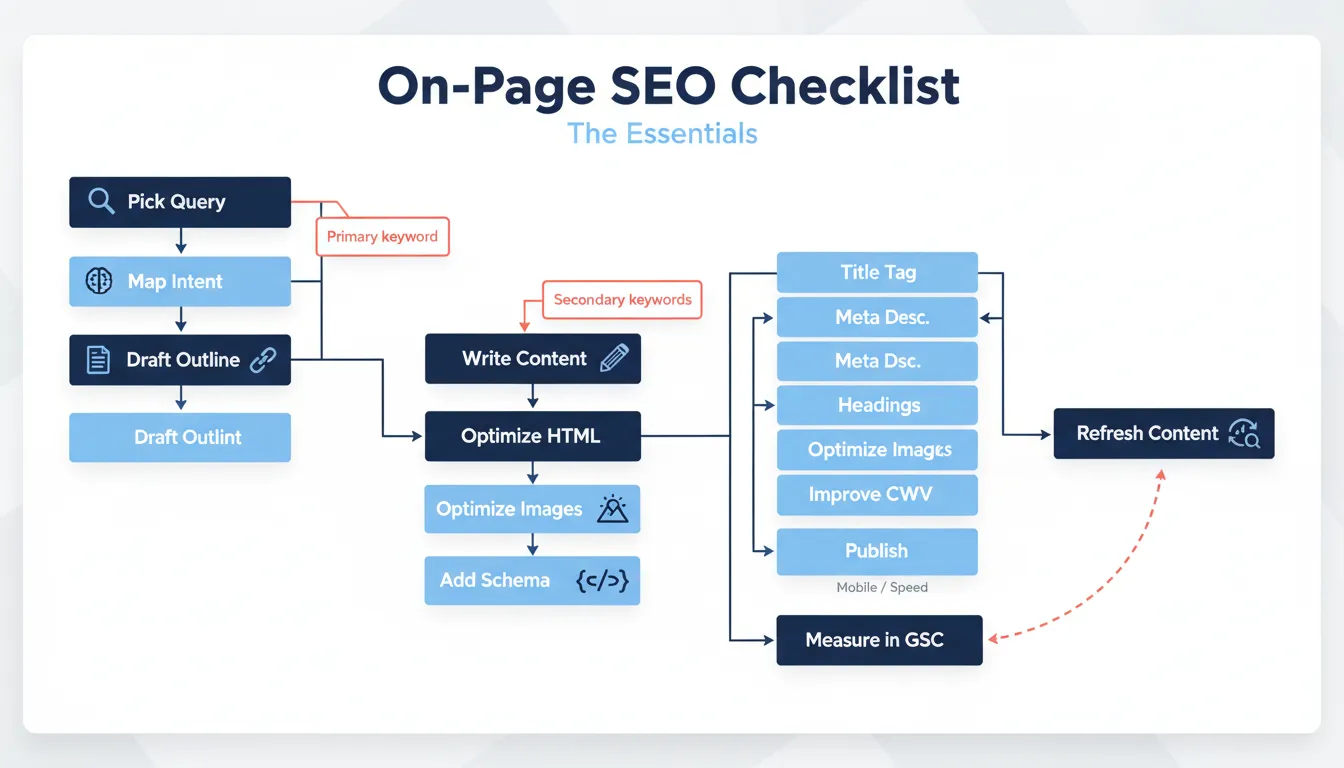
    On-page SEO checklist (the essentials)

    Use this checklist every time you publish a new page or refresh an existing one.

    Pick one primary keyword and map search intent

    Pick one primary keyword per page and write the page to satisfy that query. Then add a small set of closely related secondary terms that naturally fit your sections.

    A quick intent test:

    • If the SERP is mostly guides, your page should be educational and comprehensive.
    • If it’s mostly product pages, your page should be transactional and comparison-friendly.
    • If it’s mostly category pages, you’re probably targeting the wrong format.

    If you’re building at scale, Supawriter can turn a keyword into a structured brief (sections, angle, and supporting terms) so your content lines up with what the SERP rewards.

    Optimize title tag, meta description, and URL

    Title tag best practices (2026):

    • Put the primary keyword near the start
    • Make it descriptive (avoid vague titles like “Ultimate Guide” without context)
    • Keep it short enough to reduce truncation (many SEO guides recommend roughly the 50 to 60 character zone, depending on pixels and device) (Semrush meta tags guide)

    Meta description best practices:

    • Write it like ad copy: benefit + proof + next step
    • Include the keyword once, naturally
    • Keep it concise (Google may rewrite it anyway, but you still want a strong default)

    You’ll see different length advice across the industry. Some guides aim shorter to avoid truncation; others aim for the more traditional 150 to 160 character range. Use a character counter and prioritize clarity over hitting a perfect number.

    URL best practices:

    • Keep it readable and descriptive
    • Use hyphens, not underscores
    • Remove filler words where possible

    Example for this topic:

    • Title tag: On-page SEO best practices for 2026: practical checklist
    • Meta description: On-page SEO best practices for 2026: optimize titles, headings, content, links, images, and Core Web Vitals with a simple checklist.
    • URL: /on-page-seo-best-practices

    Structure headings for skimmability and extractable answers

    Heading structure helps users scan, and it helps machines pull clean sections.

    Basic rules:

    • Use one H1 for the page topic
    • Use H2s for the main sections
    • Use H3s for subpoints under each H2
    • Make headings specific (turn vague headings into descriptive ones)

    Flowchart of a step-by-step on-page SEO workflow from intent research to publishing and refreshing.

    Write content that earns clicks, links, and engagement

    Once your metadata and structure are solid, content quality does most of the work. In competitive SERPs, “good enough” pages tend to stall.

    Cover the topic completely with a clear content brief

    Before writing, define:

    • The promise of the page (what you will help the reader do)
    • The scope (what you cover and what you won’t)
    • The proof you can include (examples, templates, screenshots, steps)

    If you need to scale consistent briefs, Supawriter can generate a long-form outline, align it to intent, and keep your brand voice consistent across pages.

    Use on-page SEO examples: opening, sections, and FAQs

    A practical on-page pattern that often works:

    • 2 to 3 sentence opening that restates the problem and outcome
    • A short “what it is” definition
    • A checklist or step-by-step process
    • Examples, templates, and common mistakes
    • A small FAQ section (only if it helps, not just to add words)

    Here’s a quick example of answer-first writing under a heading:

    • H2: What is on-page SEO?
    • First sentence: “On-page SEO is optimizing a specific webpage’s content and HTML so it can rank for relevant searches and earn clicks.”

    That first sentence should make sense on its own if it’s pulled into a snippet.

    Optimize images and media for SEO and accessibility

    Images can improve comprehension and time on page, but they also affect performance.

    Best practices:

    • Use descriptive filenames (not IMG_1234)
    • Add alt text that describes the image for accessibility
    • Compress images and serve modern formats when possible
    • Only add images that support the content (diagrams, annotated screenshots, comparisons)

    A simple way to keep this consistent is to standardize a media checklist for every page your team publishes.

    Here’s a quick table you can reuse in your workflow:

    On-page element What “good” looks like Common mistake
    Title tag Primary keyword near front, clear benefit Keyword stuffing or vague titles
    Meta description Specific promise, readable, matches intent Duplicated across pages
    Headings Descriptive H2s/H3s, answer-first sections “Getting started” headings everywhere
    Body content Complete coverage, examples, scannable Thin content that rehashes basics
    Images Compressed, descriptive alt text Huge files that slow the page
    Internal links Points to next step and related pages Random links with generic anchor text

    Optimize the page experience and technical elements

    This is where on-page overlaps with technical SEO. You don’t need to be a developer to improve many of these.

    Internal linking and topical clusters

    Internal links do two things:

    • Help users discover the next relevant page
    • Help Google understand relationships between pages

    A practical rule: every important page should link to 2 to 5 closely related pages, and those pages should link back where it makes sense.

    If you have related posts on your site, link them with descriptive anchors like “how to do keyword research for a single page” rather than “read more.”

    Core Web Vitals, mobile UX, and page speed basics

    Google’s Search Central documentation recommends focusing on “good” Core Web Vitals because they measure real-world user experience. The current thresholds it lists are:

    • LCP: aim for 2.5s or less
    • INP: aim for under 200ms
    • CLS: aim for 0.1 or less

    These are documented in Google’s “Understanding Core Web Vitals and Google search results” page. (Google Search Central Core Web Vitals)

    On-page actions that often help without deep engineering work:

    • Compress and properly size images
    • Reduce heavy embeds and unnecessary scripts
    • Use fewer large above-the-fold elements
    • Test on mobile and fix layout shifts

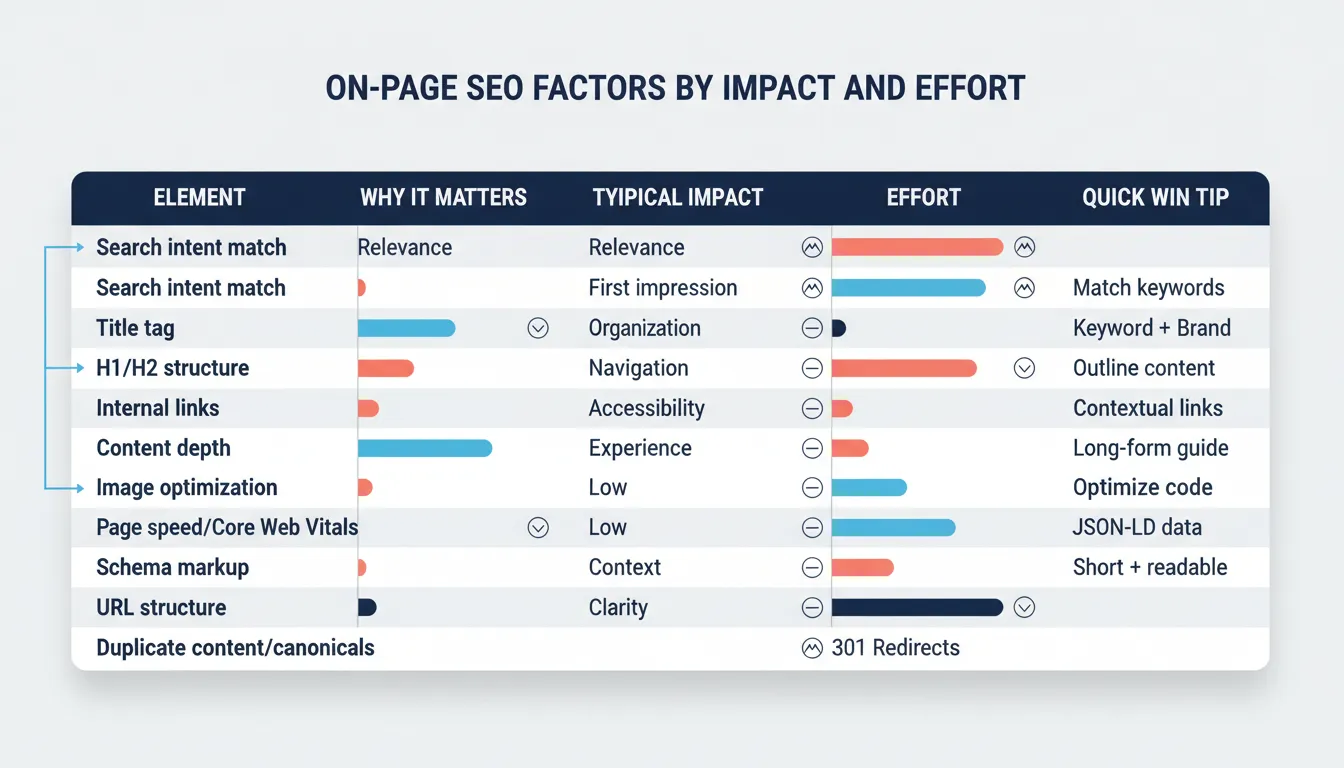
    Infographic comparing key on-page SEO factors by impact, effort, and quick-win tips.

    Schema markup and duplicate-content controls

    Schema markup can improve how your page is understood and displayed (especially for specific page types), but it should match the visible content.

    Also keep an eye on duplicate-content issues:

    • Avoid publishing multiple pages targeting the same keyword with the same angle
    • Use canonical tags when you legitimately have near-duplicates
    • Keep titles and meta descriptions unique per page

    If you’re publishing lots of content, consistency matters as much as individual optimizations. Supawriter can help teams keep standards consistent (structure, internal linking habits, and SEO fields) across dozens or hundreds of pages.

    Measure results and keep pages fresh

    On-page SEO isn’t set-and-forget. The pages that win usually go through multiple passes.

    Track what matters in Google Search Console

    For each important page, watch:

    • Queries and impressions (are you showing up for the right searches?)
    • Clicks and CTR (is your snippet earning the click?)
    • Average position (directionally useful, not a single source of truth)
    • Core Web Vitals and indexing reports (technical blockers)

    Run a 30-day refresh cycle

    A lightweight refresh loop:

    1. Week 1: Improve title and meta, and tighten the opening to match intent
    2. Week 2: Expand weak sections and add examples
    3. Week 3: Add 2 to 5 internal links and update outdated references
    4. Week 4: Re-check performance and prune what’s not helping

    Publishing cadence matters here. Consistent updates across a topic cluster can lift the whole cluster, not just one page.

    Common on-page SEO mistakes to avoid

    • Writing for keywords instead of solving the problem
    • Targeting too many keywords on one page (unclear relevance)
    • Using headings that don’t say anything
    • Duplicating titles and meta descriptions across pages
    • Adding internal links with generic anchor text
    • Ignoring mobile UX and performance until after rankings drop

    On-page SEO best practices are easy to list, but harder to do consistently across a whole site. If you want a system that helps you research, draft, optimize, and publish pages in a repeatable way, explore Supawriter and build a workflow you can keep up with.

  • Keyword Research for SEO in 2026: Step-by-Step Guide

    Keyword Research for SEO in 2026: Step-by-Step Guide

    Keyword research is the fastest way to stop guessing what to publish and start building pages you can actually rank. Done well, it’s not just a list of keywords. It’s a way to understand how people search, what they mean, and what Google is already rewarding.

    If you want to turn this into a repeatable publishing engine, Supawriter can help you go from keyword discovery to a fully optimized long-form draft and an auto-publishing workflow, while keeping everything aligned to your brand voice.

    What keyword research is and why it matters

    Keyword research vs keyword picking

    Keyword research is the process of discovering and evaluating the search queries (keywords) your audience uses, then choosing which ones you’ll target with specific pages.

    “Keyword picking” is the mistake most beginners make, you brainstorm a few ideas, pick the one that sounds right, and start writing. Keyword research adds the missing steps: expansion, validation, intent checks, and prioritization.

    Search intent in plain English

    Search intent is the reason behind a query. In practice, it answers: what does the searcher want to see right now?

    A simple intent model:

    • Informational: “how to do keyword research”, “what is keyword difficulty”
    • Commercial: “best keyword research tool”, “Ahrefs vs Semrush”
    • Transactional: “buy rank tracker”, “Semrush pricing”
    • Navigational: “Google Keyword Planner”, “Ahrefs keyword explorer”

    If you pick a keyword with the wrong intent for your page type, ranking gets harder even if the keyword looks perfect on paper.

    What success looks like for your site

    Before you open any tool, define success for the keyword set you’re building:

    • Traffic goal: more organic visits to your blog
    • Pipeline goal: more demo requests, trials, signups
    • Efficiency goal: fewer articles that go nowhere

    A helpful rule: the “best” keyword is the one that matches your audience and your offer, and that you can realistically compete for.

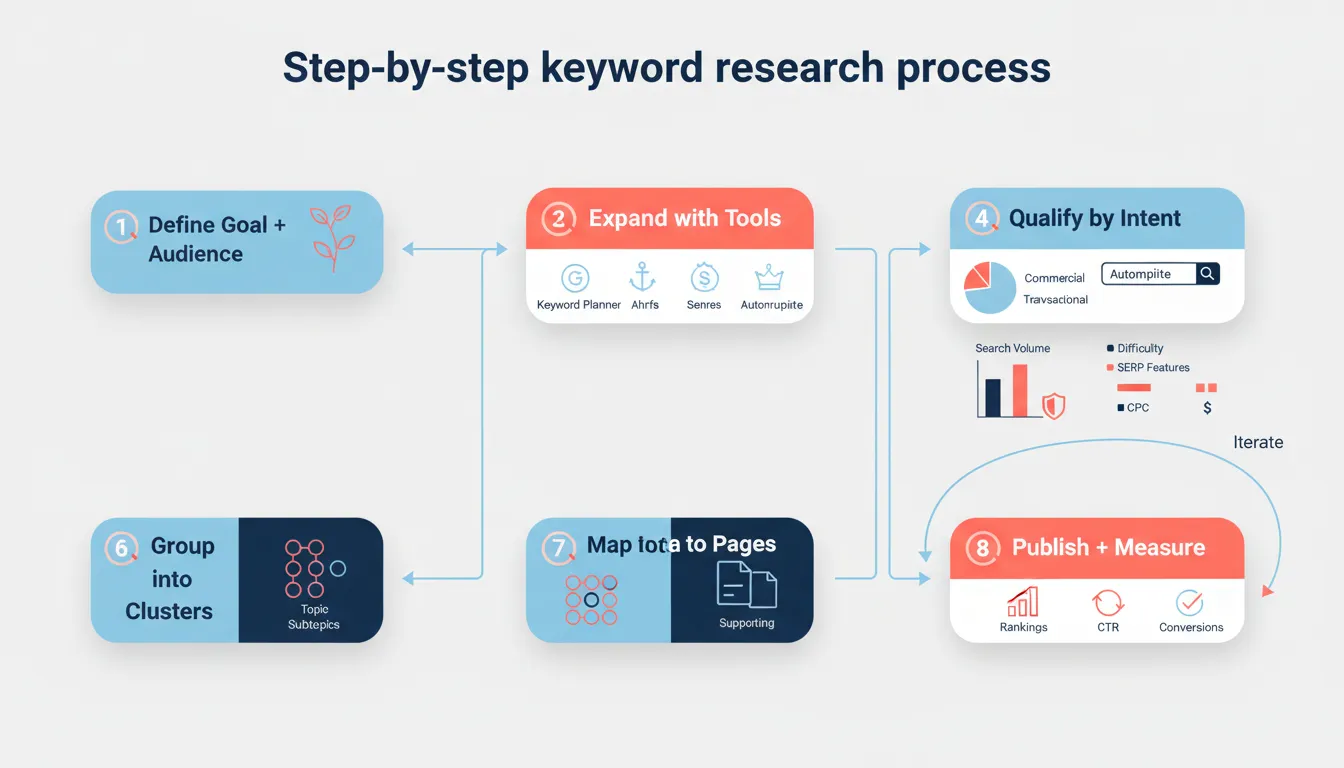
    Step-by-step keyword research process

    Start with seed keywords and audience pain points

    Seed keywords are the starting terms you feed into tools to generate thousands of related keywords. Ahrefs describes how tools use a seed keyword to expand into large keyword lists (Ahrefs keyword research guide).

    To build seeds quickly, answer these:

    • What do you sell, and what category words describe it?
    • What problems do customers describe in calls, support tickets, reviews?
    • What outcomes do they want?

    Example seed list for a SaaS content platform:

    • keyword research
    • SEO content
    • content calendar
    • internal linking
    • topic clusters

    Keep the list short. You’ll expand it next.

    Flowchart of the keyword research process from seed keywords to clustering, content creation, and iteration

    Expand your list with free and paid sources

    Use multiple sources because each one shows you different angles:

    Free expansion sources:

    • Google autocomplete and “People also ask”
    • Google Search Console (queries you already appear for)
    • Google Trends (seasonality and rising topics)
    • Google Ads Keyword Planner (ideas plus planning data)

    Paid expansion sources:

    • Ahrefs, Semrush, Moz, Mangools, SpyFu (databases, competitor data, difficulty scores)

    If you’re doing this inside a production workflow, Supawriter can speed up the middle part: discover keywords, find gaps, and turn prioritized clusters into consistent long-form articles that publish on schedule.

    Learn from competitors and SERPs

    Competitor research isn’t copying. It’s looking for patterns:

    • Which pages bring competitors their organic traffic?
    • Which topics do they cover repeatedly (and you don’t)?
    • Which formats does Google prefer for the query (guide, checklist, landing page)?

    A practical method:

    1. Search your seed keyword.
    2. Open the top 3 to 5 ranking pages.
    3. Note the page type, headings, tools mentioned, and subtopics repeated across pages.
    4. Add missing subtopics to your keyword list.

    This pulls what’s working in the SERP without turning your content into a clone.

    Choose the right keywords (metrics + intent)

    The core metrics to evaluate (volume, difficulty, CPC, trends)

    Most keyword tools give you some version of:

    • Search volume: average monthly searches
    • Difficulty / competition: how hard ranking tends to be
    • CPC: what advertisers pay (often a proxy for commercial value)
    • Trend/seasonality: whether demand is rising or shrinking

    HubSpot frames the beginner workflow as starting with a seed keyword, then checking search volume, keyword difficulty, and intent as key metrics (HubSpot keyword research article).

    Manually check the SERP before you commit

    Tool metrics are estimates. The SERP is reality.

    Before you choose a target keyword, check:

    • Are results mostly blog posts, product pages, or videos?
    • Are huge brands dominating, and do you have comparable authority?
    • Are there SERP features stealing clicks (featured snippets, videos, shopping)?
    • Do the top results actually answer the query well, or is there a gap?

    Often the best opportunity is a keyword where:

    • intent is clear
    • content quality in the top results is good but not great
    • you can add a useful angle (examples, templates, updated process, better UX)

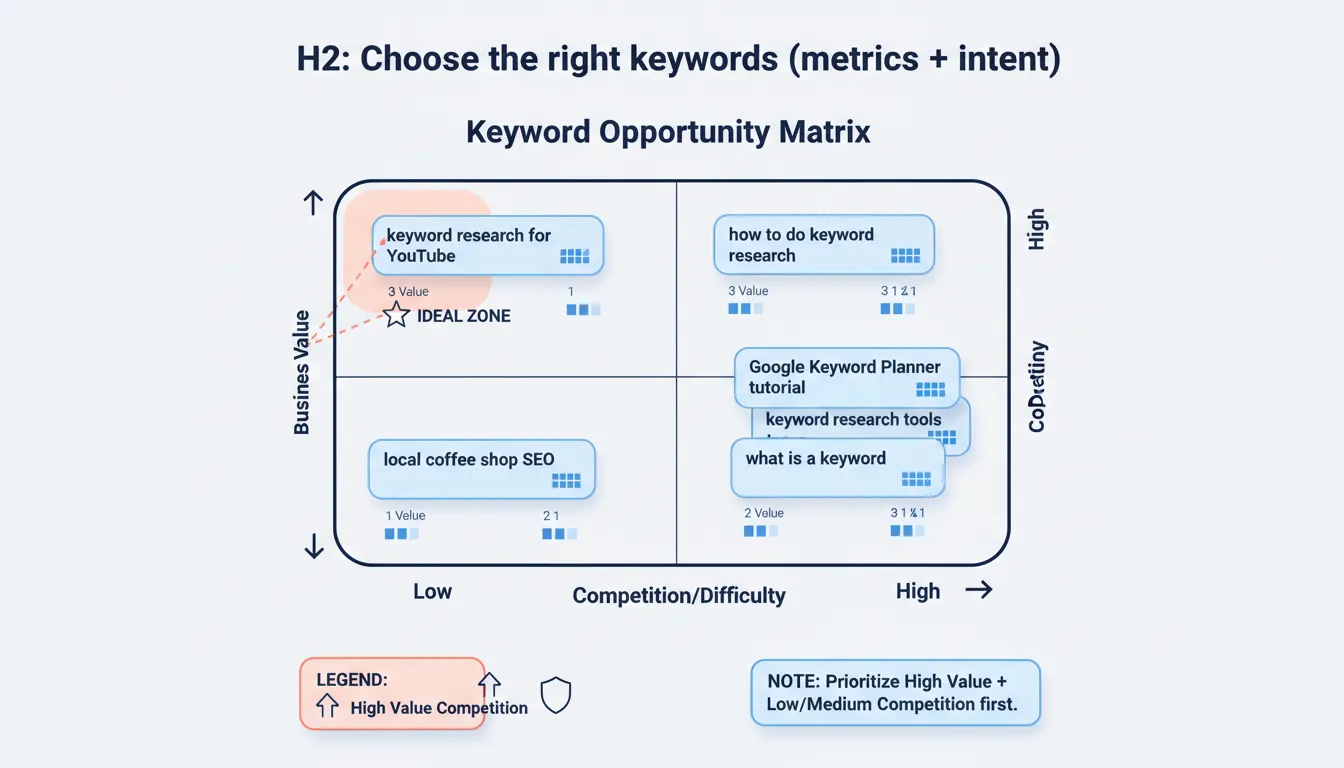
    Find your sweet spot with a simple prioritization model

    Use a lightweight scoring model so your list becomes a plan.

    One simple approach:

    • Business value (low, medium, high)
    • Competition (low, medium, high)

    Prioritize high value plus low or medium competition first.

    Keyword opportunity matrix comparing business value vs competition with example keyword bubbles

    Turn keywords into a content plan that ranks

    Cluster keywords by topic and intent

    A keyword cluster is a group of closely related keywords you can target with:

    • one main page (pillar)
    • several supporting pages (cluster content)

    Clustering prevents cannibalization (multiple pages fighting for the same keyword) and makes internal linking more natural.

    Example cluster:

    • Pillar: keyword research
    • Supporting:
      • keyword research examples
      • keyword research for SEO
      • keyword research for blog
      • keyword research for free
      • Google Keyword Planner tutorial

    Map keywords to pages (pillar, supporting, product)

    Treat keywords as an information architecture exercise:

    • Pillar page: broad, high-intent topic (“keyword research”)
    • Supporting posts: narrower subtopics (“keyword research for YouTube”)
    • Product pages: transactional and feature-driven (“SEO content automation platform”)

    Once you have this mapped, your on-page execution matters a lot. If you want a checklist that pairs well with this stage, use on-page SEO best practices for 2026 while you draft and optimize.

    Write briefs that make ranking more likely

    Before writing, create a one-page brief per target keyword:

    • primary keyword plus 3 to 6 secondary keywords
    • search intent (what the SERP expects)
    • required sections (based on common headings in top results)
    • unique angle (what you’ll add that others don’t)
    • internal links to include

    This is where Supawriter helps teams: it can turn your brief into a consistent long-form article in your brand voice, optimize for SEO fundamentals, and keep a predictable publishing cadence.

    Examples and templates you can copy

    Keyword research examples for SEO and blog content

    Here are a few solid keyword choices depending on your situation:

    • New site: “keyword research for blog” (more specific intent, often less competitive)
    • Tool-led post: “Google Keyword Planner tutorial” (clear how-to intent)
    • Commercial comparison: “best keyword research tool” (high value, often more competitive)

    A good next step is to pick one primary keyword per page, then support it with closely related secondary keywords instead of cramming everything into one article.

    Keyword research for Google Ads vs SEO

    SEO keyword research and Google Ads keyword research overlap, but the decision criteria differ:

    • SEO: intent match, content depth, backlinks/authority, long-term traffic
    • Ads: cost, conversion rate, landing page relevance, budget forecasts

    Google Ads Keyword Planner is designed for planning campaigns, and Google’s documentation highlights using “Discover new keywords” and building a keyword plan inside the tool (Google Keyword Planner overview).

    Zapier’s review also notes Keyword Planner’s forecasting and budget planning strengths, and that it’s free (Zapier free keyword tool roundup).

    A simple keyword spreadsheet template

    You don’t need a fancy system to start. Use a sheet with these columns and score consistently.

    Cluster Primary keyword Secondary keywords Intent Volume (est.) Difficulty (est.) CPC (est.) Business value (1-5) Priority (Now/Next/Later) Target page Notes
    Keyword research keyword research keyword research for SEO, keyword research examples Informational /blog/keyword-research Pillar guide
    Keyword research Google Keyword Planner keyword planner tutorial, discover new keywords Informational/Commercial /blog/google-keyword-planner Include screenshots
    Content ops content calendar for SEO SEO calendar, editorial calendar Informational /blog/seo-content-calendar Tie to workflow

    Fill in the metric estimates from your tool of choice, then sort by Priority.

    If you want to go from spreadsheet to publishing without adding more process overhead, Supawriter can take your prioritized clusters, generate SEO-focused long-form articles in your voice, and auto-publish them to an embeddable blog that works with your existing site. That way, keyword research turns into execution instead of a backlog.