
Internal linking is one of the few SEO levers you fully control, but it is also easy to neglect as your content library grows. Internal linking tools make the work repeatable, they audit your site’s internal links, surface link opportunities, and in some cases insert links automatically.
If you are building a content engine, internal links are not a one-time checklist item. You need a system that keeps new posts connected, strengthens topic clusters, and prevents orphan pages from slipping out of the crawl path. That consistency is easier to keep with Supawriter, especially if you publish frequently and want internal linking to happen as part of writing and publishing.
What internal linking tools do (and what to look for)
The jobs these tools automate
Most internal linking tools handle three jobs:
- Internal link discovery and audits: Find orphan pages, broken internal links, redirect chains, pages that are too deep in your crawl path, and pages with weak internal link signals.
- Contextual internal link suggestions: Recommend which pages you should link to from a given page (and sometimes suggest anchor text).
- Implementation help: Insert links in the editor, bulk-add links, or auto-link terms based on rules.
Good tools do not just add more links. They help you keep a clean internal structure so important pages are easier for users and crawlers to find, and so internal authority can flow through your site. Semrush, for example, calls out internal linking issues and orphan pages as part of its auditing workflow, see the Semrush internal links guide.
Features that matter most in 2026
When you compare internal linking tools, it helps to use a simple checklist instead of getting distracted by AI labels:
- Suggestion quality: Are recommendations based on topical relevance, not just keyword matches?
- Controls and exclusions: Can you exclude pages, categories, or URL patterns? Can you stop links to conversion pages appearing in every paragraph?
- Anchor text governance: Can you edit anchors, enforce variations, and avoid repetitive exact-match anchors?
- Workflow: Is there a review queue, or is it fully automatic? Can multiple team members collaborate?
- Scalability: Does it handle thousands of URLs without turning into a spreadsheet project?
- Data sources: Crawl-only, or does it pull in performance signals (Search Console, analytics) so you can prioritize?
Common mistakes to avoid with automation
Automation helps, but it can also create patterns that feel spammy or hard to read:
- Over-linking: Stuffing internal links into every sentence makes content harder to read.
- Weak source pages: Linking from thin pages does less than strengthening your content hubs.
- Bad anchors: Repetitive anchors, vague anchors (“here”), or anchors that do not match the destination.
- Linking to redirects: Automated insertion can accidentally point to redirected URLs if your site is not clean.
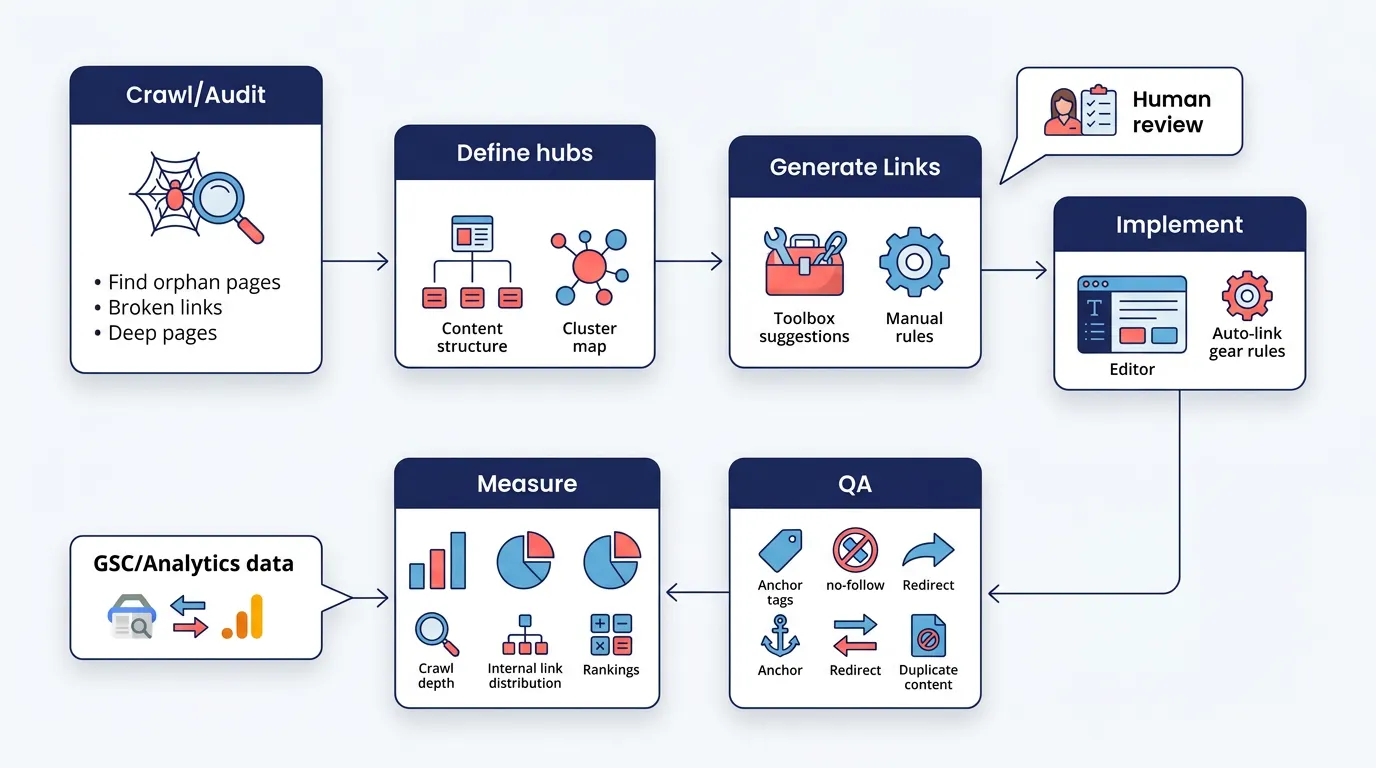
A safe approach is simple: tools generate candidates, humans approve patterns, then you measure impact over time.
10 best internal linking tools in 2026 (reviewed)
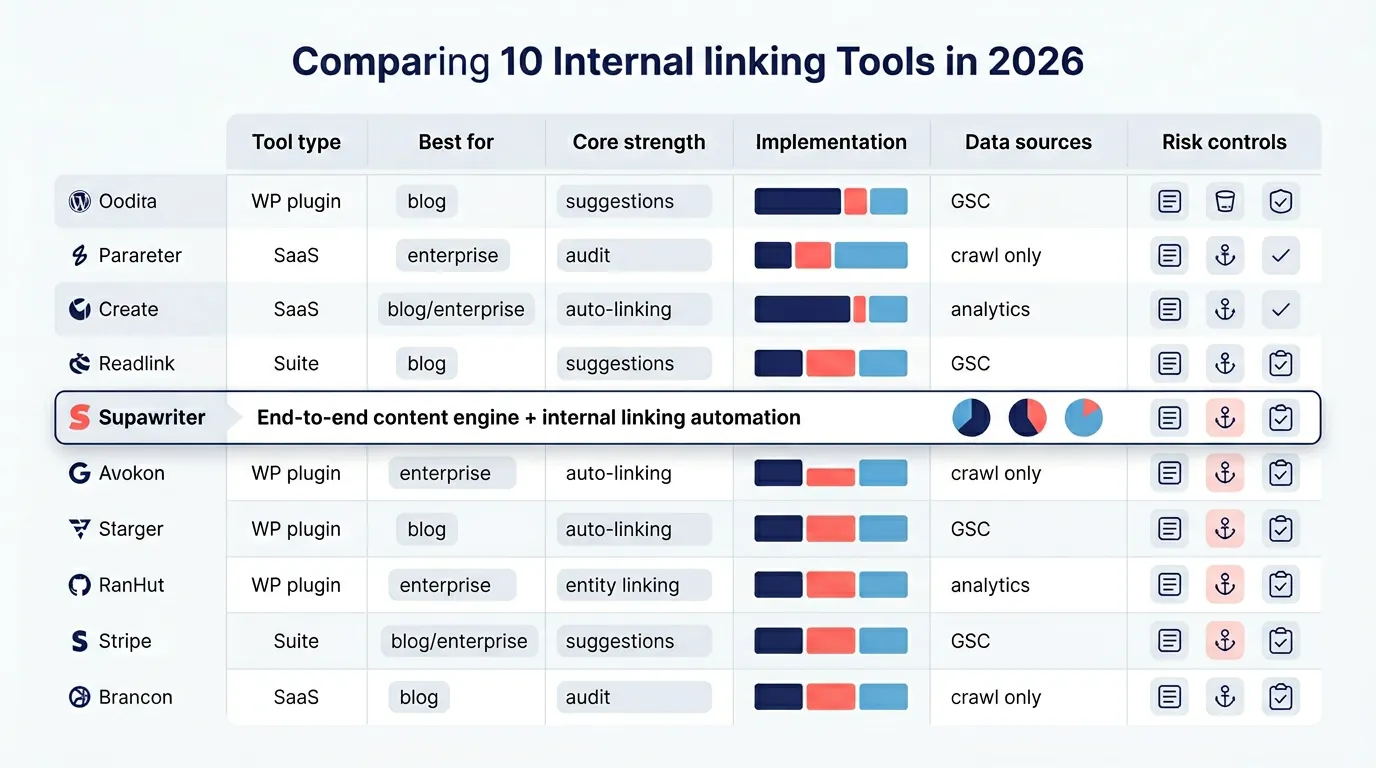
Below are 10 widely used options across three buckets: WordPress plugins, SEO suites, and specialized internal linking platforms.
| Tool | Type | Best for | Strength | Implementation style |
|---|---|---|---|---|
| Supawriter | Content engine + CMS | SaaS teams, agencies, scale publishing | Internal linking built into writing and publishing | Automated suggestions with editorial control |
| Link Whisper | WP plugin | WordPress publishers | Strong suggestions + reporting | In-editor + bulk features |
| Yoast SEO Premium | WP plugin | WP teams already using Yoast | Simple inline suggestions | In-editor suggestions |
| AIOSEO Link Assistant | WP plugin | WP marketers | Suggestions inside WP | In-editor workflows |
| Rank Math | WP plugin | WP power users | SEO suite features | In-editor + module-based |
| Internal Link Juicer | WP plugin | WP sites that want rule-based links | Auto-link rules | Automated by keywords/rules |
| Semrush Site Audit | SEO suite | Teams that need audits at scale | Diagnostics and issue lists | Fixes implemented in CMS/dev |
| Surfer Automated Internal Linking | SEO tool | Content teams using Surfer | Fast contextual insertion | Semi-automated insertion |
| InLinks | SEO platform | Entity-focused SEO | Entity-based linking and audits | Recommendations + implementation approach |
| LinkStorm | Specialized tool | Agencies and publishers | AI suggestions at scale | Suggestion + implementation support |
1) Supawriter
Supawriter is an AI-driven SEO content engine and CMS that can research, write, optimize, and publish long-form content. Internal linking fits naturally because the platform is built around maintaining a connected content library, not just generating a single draft.
Key internal-linking-related capabilities include suggesting internal links while producing long-form content, keeping topical coverage consistent across a content calendar (which makes linking more predictable), and tying internal links into the wider on-page workflow so links do not become a cleanup task.
Pros
- Works well when internal linking needs to scale with publishing.
- Keeps internal linking connected to content strategy, not just page-level edits.
Cons
- If you only want a WordPress plugin that inserts links, a dedicated WP tool may feel simpler.
Best for: SaaS founders and growth teams, in-house content teams, and agencies that want an end-to-end system.
Pricing: Varies by plan; check the product page for current tiers.
2) Link Whisper
Link Whisper is an internal linking plugin known for generating link suggestions and helping you implement them quickly in WordPress.
Key features
- Internal link suggestions inside your workflow.
- Reporting to spot gaps and opportunities.
Pros
- Good fit for WordPress sites that want link suggestions without switching platforms.
- Straightforward to use for non-technical teams.
Cons
- WordPress-only constraints can be limiting for multi-site or headless setups.
- You still need editorial judgment to keep links natural.
Best for: WordPress blogs and content-heavy sites.
Pricing: Paid plugin; exact pricing varies.
3) Yoast SEO Premium
Yoast SEO Premium includes internal linking suggestions that point you to relevant posts to link to while you write and edit, see Yoast internal linking suggestions.
Key features
- Suggestions inside the WordPress editor.
- Designed to speed up linking during editing.
Pros
- A good choice if your team already uses Yoast for on-page SEO.
- Easy to adopt.
Cons
- More limited than dedicated internal linking tools if you want deep audits, orphan-page workflows, or bulk operations.
Best for: WordPress teams that want simple linking guidance during editing.
Pricing: Included with Yoast Premium.
4) AIOSEO Link Assistant
All in One SEO (AIOSEO) includes a Link Assistant feature set that supports internal linking workflows inside WordPress.
Key features
- Link suggestions and internal link management inside WordPress.
- Positioned as a broader SEO plugin with internal linking support.
Pros
- Convenient if you want fewer plugins overall.
- Friendly UI for marketers.
Cons
- For large sites, internal linking depth may not match specialized tools.
Best for: SMB WordPress sites that want an SEO suite with internal link support.
Pricing: Paid tiers; exact pricing varies.
5) Rank Math
Rank Math is a WordPress SEO plugin with modular features, often used by teams that want granular control over SEO settings.
Key features
- Suite-style WordPress SEO tooling.
- Internal linking capabilities depend on configuration and modules.
Pros
- Flexible, especially for advanced WordPress setups.
- Useful if you want one plugin handling many SEO tasks.
Cons
- Can be overkill if your only goal is internal linking.
Best for: WordPress power users who want a configurable SEO suite.
Pricing: Free and paid plans depending on features.
6) Internal Link Juicer
Internal Link Juicer is used for rule-based internal linking, where you define keywords and target URLs and the plugin inserts links automatically.
Key features
- Automated linking based on terms and rules.
- Controls to prevent over-linking and manage placements.
Pros
- Useful for sites that want consistent, rule-driven internal links.
- Cuts down repetitive manual work.
Cons
- Rule-based automation can create awkward links if you do not curate your keyword list.
- Higher risk of repetitive anchors if not managed.
Best for: WordPress sites with stable pages and clear keyword-to-URL mappings.
Pricing: Varies by plan.
7) Semrush Site Audit
Semrush Site Audit is not an internal linking insertion tool, but it is a practical way to identify internal linking issues at scale, including orphan pages and other structural problems you then fix in your CMS. See the Semrush internal links guide.
Key features
- Crawls and flags common internal linking issues.
- Helps you prioritize fixes.
Pros
- Strong for diagnosis and prioritization.
- Useful for teams with dev resources or structured content ops.
Cons
- You still need a workflow to implement fixes.
Best for: SEO teams that want auditing and issue tracking across large sites.
Pricing: Part of Semrush plans.
8) Surfer automated internal linking
Surfer includes an automated internal linking tool meant to insert contextual internal links quickly and strengthen site structure, see the Surfer automated internal linking tool.
Key features
- Automated contextual insertion workflow.
- Designed to speed up implementation.
Pros
- Helpful when you need to add internal links across many pages quickly.
- Handy if Surfer is already part of your content stack.
Cons
- You still need rules to avoid over-linking or odd anchors.
Best for: Content teams already using Surfer.
Pricing: Depends on Surfer plan.
9) InLinks (entity-based internal linking)
InLinks positions its internal linking around entities, aiming to map your content to concepts rather than only keywords, see the InLinks internal linking tool.
Key features
- Entity-based internal linking recommendations.
- Useful for topical structure and semantic consistency.
Pros
- Strong choice if your strategy is topic-driven.
- Can reduce the “exact match anchor everywhere” problem.
Cons
- May take a mindset shift if your team is used to purely keyword-based workflows.
Best for: Teams investing in entity SEO and topical authority.
Pricing: SaaS pricing varies.
10) LinkStorm
LinkStorm is a specialized internal linking tool that uses AI-based link suggestions and is often aimed at publishers and agencies.
Key features
- AI suggestions for internal linking.
- Built for scale and speed.
Pros
- Good for teams that want specialized internal link suggestions across large content libraries.
Cons
- Still needs a clear editorial policy and measurement plan.
Best for: Agencies and publishers managing many pages.
Pricing: Varies by plan.
How to choose the right internal linking tool for your site
If you run WordPress
Start by deciding whether you want:
- In-editor suggestions (good for writers): Yoast Premium, AIOSEO, Link Whisper.
- More dedicated internal linking management (good for SEOs): Link Whisper.
- Rule-based auto-linking (good for stable sites with clear mappings): Internal Link Juicer.
If your team publishes occasionally, a plugin is often enough. If you publish weekly across multiple categories, you will want stronger reporting, exclusions, and bulk workflows so internal linking stays consistent.
If you publish at scale (SaaS, agencies, multi-site)
At higher volume, the hard part is not adding a link, it is keeping structure coherent over time. That is where an end-to-end engine can outperform standalone plugins.
When you are scaling content and trying to keep internal linking consistent across a growing library, Supawriter can make it easier to treat internal linking as part of the publishing workflow instead of a separate cleanup project.
Practical rule: if internal linking tasks keep getting pushed to “later,” you need a tool that builds linking into creation and refresh cycles.
If you are enterprise or technical SEO heavy
Enterprises usually need:
- Audit-first workflows with clear issue lists and prioritization
- Governance, including change logs, review queues, and strong controls
- Cross-team collaboration (SEO, editorial, dev)
Tools like Semrush help surface issues, but you still need a process for implementing changes safely across templates, navigation, and content.
A practical internal linking workflow you can copy
Step 1: Audit and prioritize pages
Run an audit first, even if you think you already know your site. The output should be a prioritized backlog:
- Orphan pages (pages with no internal links pointing to them)
- Broken internal links and links to redirected URLs
- Important pages that are too deep (buried)
- Content hubs that are missing supportive cluster links
Semrush highlights orphan pages and other internal linking problems as common audit findings, which makes it a useful starting point for building your backlog, see the Semrush internal links guide.
Step 2: Build hubs and rules for anchors
Before you accept tool suggestions at scale, define a few rules:
- Each topic cluster should have a clear hub page (or primary page).
- Cluster pages should link up to the hub with descriptive anchors.
- Hubs should link out to cluster pages in a way that helps navigation.
- Anchors should be natural and specific, not forced exact matches.
Internal linking tools work better when they are optimizing a structure you already planned.
Step 3: Implement, QA, and measure
Implementation options:
- If you are using WordPress plugins, approve suggestions while editing.
- If you are using automation, roll out changes gradually and spot-check pages.
QA checklist:
- Links point directly to 200-status URLs (not redirects)
- Anchors match the destination
- No repeated anchors in the same section
- Links are placed where a reader would actually want them
Measurement:
- Track whether important pages get crawled more consistently.
- Watch ranking changes for cluster pages after adding internal links.
- Watch engagement, internal links should help users find more relevant content.
If you want this to run as an always-on process, Supawriter can help teams publish new content with internal linking handled in the same workflow that schedules, optimizes, and maintains the blog.
FAQ about internal linking tools
Are free internal linking tools worth it?
Free tools can help with spot checks, like basic link counts or reviewing a single page. They often do not solve the main problem, maintaining internal linking across hundreds or thousands of pages. If internal links affect revenue pages, integrations and workflow controls matter more than saving a monthly fee.
How many internal links per page is too many?
There is no universal number. Use a reader-first rule: add internal links where they help someone take the next step. Tools should help you find relevant links, not inflate link counts.
Do AI internal linking tools create risky links?
They can if you let them publish automatically without guardrails. The lowest-risk setup is a hybrid: the tool generates candidates, you set exclusions and anchor rules, and you review patterns. Tools that support governance are safer than set-and-forget auto-linking.
Internal linking is an SEO fundamental that pays off over time, but only if you turn it into a repeatable process. If you want a system that keeps internal linking aligned with your content strategy while you scale publishing, see how Supawriter can research, write, optimize, and publish content with internal links handled in the same end-to-end workflow.
Leave a Reply