
Keyword research is the fastest way to stop guessing what to publish and start building pages you can actually rank. Done well, it’s not just a list of keywords. It’s a way to understand how people search, what they mean, and what Google is already rewarding.
If you want to turn this into a repeatable publishing engine, Supawriter can help you go from keyword discovery to a fully optimized long-form draft and an auto-publishing workflow, while keeping everything aligned to your brand voice.
What keyword research is and why it matters
Keyword research vs keyword picking
Keyword research is the process of discovering and evaluating the search queries (keywords) your audience uses, then choosing which ones you’ll target with specific pages.
“Keyword picking” is the mistake most beginners make, you brainstorm a few ideas, pick the one that sounds right, and start writing. Keyword research adds the missing steps: expansion, validation, intent checks, and prioritization.
Search intent in plain English
Search intent is the reason behind a query. In practice, it answers: what does the searcher want to see right now?
A simple intent model:
- Informational: “how to do keyword research”, “what is keyword difficulty”
- Commercial: “best keyword research tool”, “Ahrefs vs Semrush”
- Transactional: “buy rank tracker”, “Semrush pricing”
- Navigational: “Google Keyword Planner”, “Ahrefs keyword explorer”
If you pick a keyword with the wrong intent for your page type, ranking gets harder even if the keyword looks perfect on paper.
What success looks like for your site
Before you open any tool, define success for the keyword set you’re building:
- Traffic goal: more organic visits to your blog
- Pipeline goal: more demo requests, trials, signups
- Efficiency goal: fewer articles that go nowhere
A helpful rule: the “best” keyword is the one that matches your audience and your offer, and that you can realistically compete for.
Step-by-step keyword research process
Start with seed keywords and audience pain points
Seed keywords are the starting terms you feed into tools to generate thousands of related keywords. Ahrefs describes how tools use a seed keyword to expand into large keyword lists (Ahrefs keyword research guide).
To build seeds quickly, answer these:
- What do you sell, and what category words describe it?
- What problems do customers describe in calls, support tickets, reviews?
- What outcomes do they want?
Example seed list for a SaaS content platform:
- keyword research
- SEO content
- content calendar
- internal linking
- topic clusters
Keep the list short. You’ll expand it next.
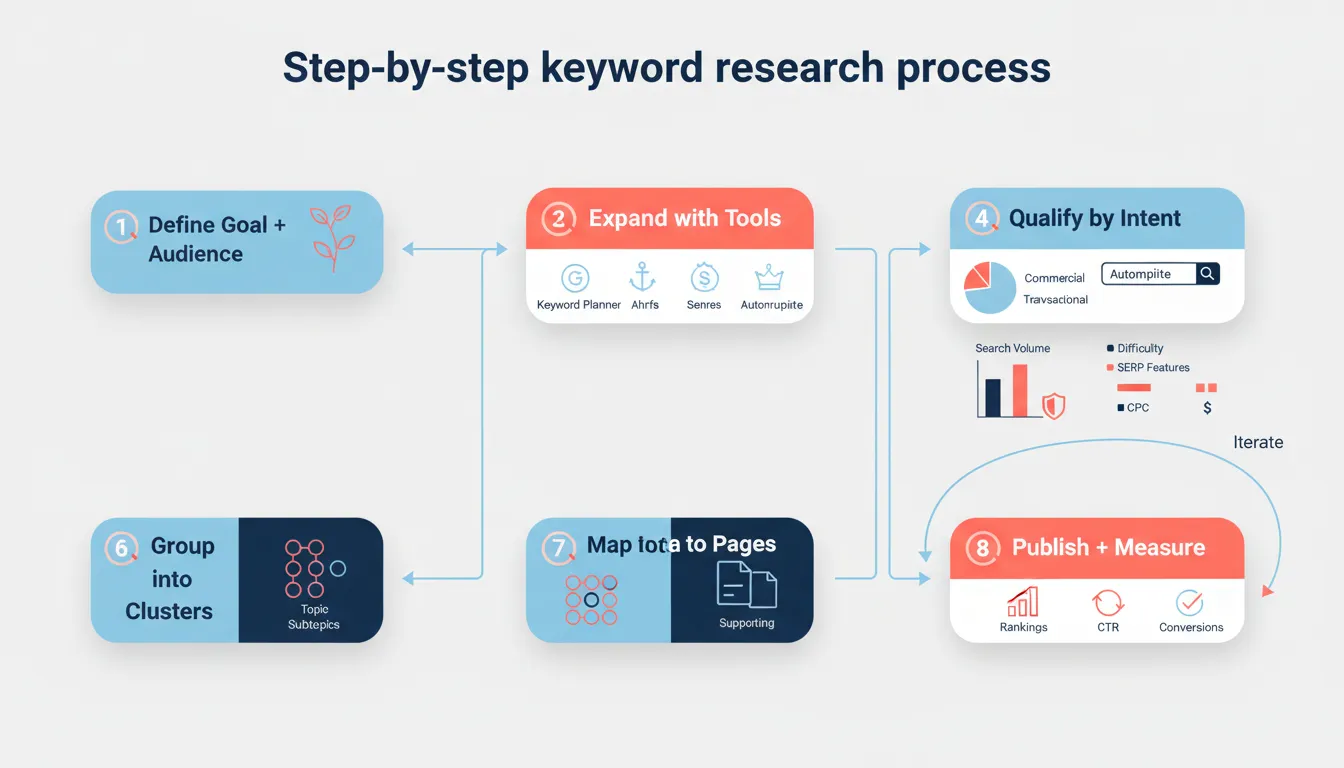
Expand your list with free and paid sources
Use multiple sources because each one shows you different angles:
Free expansion sources:
- Google autocomplete and “People also ask”
- Google Search Console (queries you already appear for)
- Google Trends (seasonality and rising topics)
- Google Ads Keyword Planner (ideas plus planning data)
Paid expansion sources:
- Ahrefs, Semrush, Moz, Mangools, SpyFu (databases, competitor data, difficulty scores)
If you’re doing this inside a production workflow, Supawriter can speed up the middle part: discover keywords, find gaps, and turn prioritized clusters into consistent long-form articles that publish on schedule.
Learn from competitors and SERPs
Competitor research isn’t copying. It’s looking for patterns:
- Which pages bring competitors their organic traffic?
- Which topics do they cover repeatedly (and you don’t)?
- Which formats does Google prefer for the query (guide, checklist, landing page)?
A practical method:
- Search your seed keyword.
- Open the top 3 to 5 ranking pages.
- Note the page type, headings, tools mentioned, and subtopics repeated across pages.
- Add missing subtopics to your keyword list.
This pulls what’s working in the SERP without turning your content into a clone.
Choose the right keywords (metrics + intent)
The core metrics to evaluate (volume, difficulty, CPC, trends)
Most keyword tools give you some version of:
- Search volume: average monthly searches
- Difficulty / competition: how hard ranking tends to be
- CPC: what advertisers pay (often a proxy for commercial value)
- Trend/seasonality: whether demand is rising or shrinking
HubSpot frames the beginner workflow as starting with a seed keyword, then checking search volume, keyword difficulty, and intent as key metrics (HubSpot keyword research article).
Manually check the SERP before you commit
Tool metrics are estimates. The SERP is reality.
Before you choose a target keyword, check:
- Are results mostly blog posts, product pages, or videos?
- Are huge brands dominating, and do you have comparable authority?
- Are there SERP features stealing clicks (featured snippets, videos, shopping)?
- Do the top results actually answer the query well, or is there a gap?
Often the best opportunity is a keyword where:
- intent is clear
- content quality in the top results is good but not great
- you can add a useful angle (examples, templates, updated process, better UX)
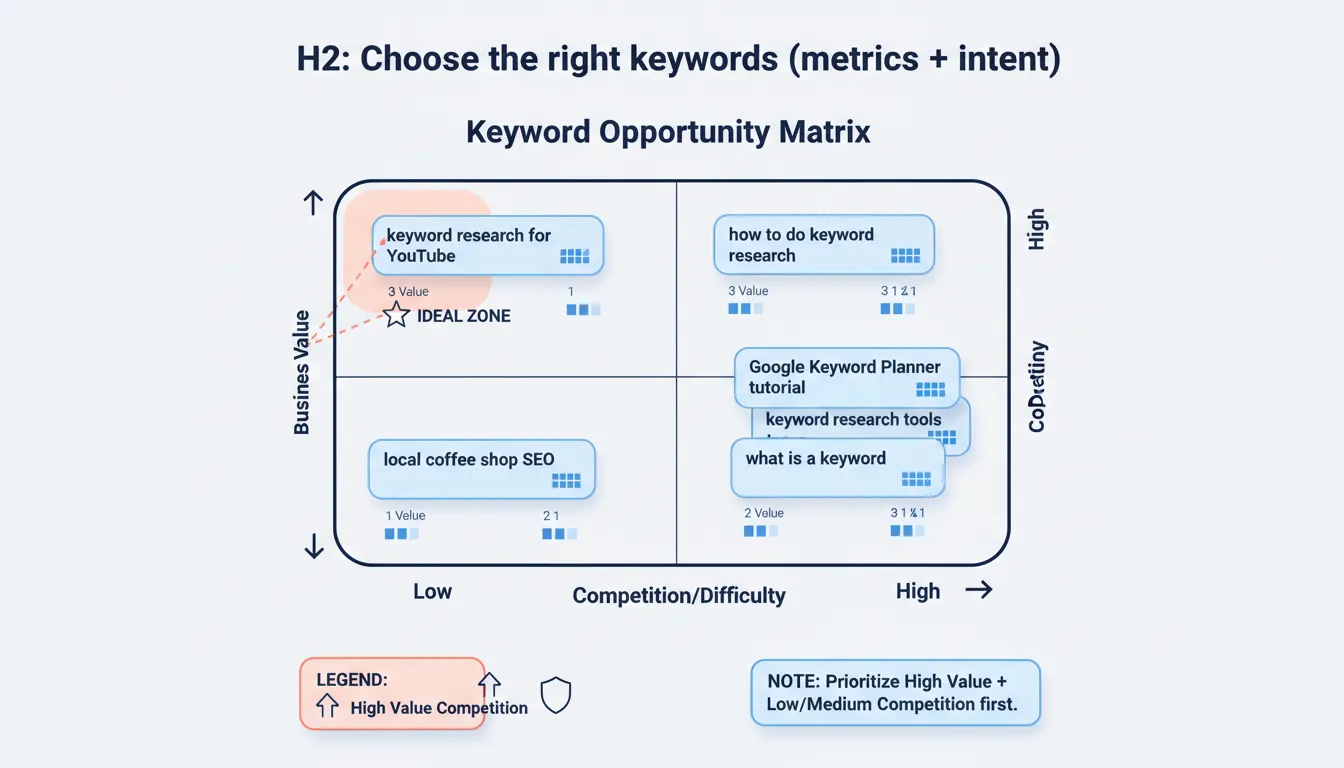
Find your sweet spot with a simple prioritization model
Use a lightweight scoring model so your list becomes a plan.
One simple approach:
- Business value (low, medium, high)
- Competition (low, medium, high)
Prioritize high value plus low or medium competition first.
Turn keywords into a content plan that ranks
Cluster keywords by topic and intent
A keyword cluster is a group of closely related keywords you can target with:
- one main page (pillar)
- several supporting pages (cluster content)
Clustering prevents cannibalization (multiple pages fighting for the same keyword) and makes internal linking more natural.
Example cluster:
- Pillar: keyword research
- Supporting:
- keyword research examples
- keyword research for SEO
- keyword research for blog
- keyword research for free
- Google Keyword Planner tutorial
Map keywords to pages (pillar, supporting, product)
Treat keywords as an information architecture exercise:
- Pillar page: broad, high-intent topic (“keyword research”)
- Supporting posts: narrower subtopics (“keyword research for YouTube”)
- Product pages: transactional and feature-driven (“SEO content automation platform”)
Once you have this mapped, your on-page execution matters a lot. If you want a checklist that pairs well with this stage, use on-page SEO best practices for 2026 while you draft and optimize.
Write briefs that make ranking more likely
Before writing, create a one-page brief per target keyword:
- primary keyword plus 3 to 6 secondary keywords
- search intent (what the SERP expects)
- required sections (based on common headings in top results)
- unique angle (what you’ll add that others don’t)
- internal links to include
This is where Supawriter helps teams: it can turn your brief into a consistent long-form article in your brand voice, optimize for SEO fundamentals, and keep a predictable publishing cadence.
Examples and templates you can copy
Keyword research examples for SEO and blog content
Here are a few solid keyword choices depending on your situation:
- New site: “keyword research for blog” (more specific intent, often less competitive)
- Tool-led post: “Google Keyword Planner tutorial” (clear how-to intent)
- Commercial comparison: “best keyword research tool” (high value, often more competitive)
A good next step is to pick one primary keyword per page, then support it with closely related secondary keywords instead of cramming everything into one article.
Keyword research for Google Ads vs SEO
SEO keyword research and Google Ads keyword research overlap, but the decision criteria differ:
- SEO: intent match, content depth, backlinks/authority, long-term traffic
- Ads: cost, conversion rate, landing page relevance, budget forecasts
Google Ads Keyword Planner is designed for planning campaigns, and Google’s documentation highlights using “Discover new keywords” and building a keyword plan inside the tool (Google Keyword Planner overview).
Zapier’s review also notes Keyword Planner’s forecasting and budget planning strengths, and that it’s free (Zapier free keyword tool roundup).
A simple keyword spreadsheet template
You don’t need a fancy system to start. Use a sheet with these columns and score consistently.
| Cluster | Primary keyword | Secondary keywords | Intent | Volume (est.) | Difficulty (est.) | CPC (est.) | Business value (1-5) | Priority (Now/Next/Later) | Target page | Notes |
|---|---|---|---|---|---|---|---|---|---|---|
| Keyword research | keyword research | keyword research for SEO, keyword research examples | Informational | /blog/keyword-research | Pillar guide | |||||
| Keyword research | Google Keyword Planner | keyword planner tutorial, discover new keywords | Informational/Commercial | /blog/google-keyword-planner | Include screenshots | |||||
| Content ops | content calendar for SEO | SEO calendar, editorial calendar | Informational | /blog/seo-content-calendar | Tie to workflow |
Fill in the metric estimates from your tool of choice, then sort by Priority.
If you want to go from spreadsheet to publishing without adding more process overhead, Supawriter can take your prioritized clusters, generate SEO-focused long-form articles in your voice, and auto-publish them to an embeddable blog that works with your existing site. That way, keyword research turns into execution instead of a backlog.